Need to expand your network? Do not limit yourself to French users, open up to people from all over the world! This is possible thanks to LinkedIn™ translation , a service that allows you to translate your LinkedIn™ profile into several languages. How to boost your accessibility and visibility with LinkedIn™ profile translation, we explain everything in this article!
Why translate your LinkedIn™ profile?
The main benefit of translating your LinkedIn™ profile is international openness. Extending your commercial prospecting area allows you to develop your business in b2b. Indeed, demand may be present in other growing markets. With a LinkedIn™ profile available only in your native language, it’s hard to get connections from other members who speak Japanese, Russian, or English, for example. If you are looking for a job or have projects abroad, translating your LinkedIn™ profile is essential!
In addition, the user experience is also to be taken into account. People won’t take the time to translate your profile themselves and if it’s not suited to your target, they’ll move on! It’s a business opportunity that’s slipping away from you. Translating your LinkedIn™ profile into other languages is therefore essential if you want to conquer the market in other countries.

When you translate your profile, you create a second profile which has its own URL on Google™. It is possible to create as many profiles as you wish to make browsing easier for users, regardless of their geographical location.
For example, if you have a second profile for Germany and a German LinkedIn™ member comes across your profile, it appears in the default language they use. You thus increase your visibility with customers and prospects even if you do not have the same mother tongue.
Remember that social networks are formidable communication tools! LinkedIn™ being the first social network for btob professionals in the world, it is important to optimize your profile as much as possible to reach leads and prospects.
LinkedIn™ translator, how to translate your LinkedIn™ profile?
To translate your LinkedIn™ profile:
- From a computer, go to your LinkedIn™ profile .
- In the menu on the right, select “Add a profile in another language”.
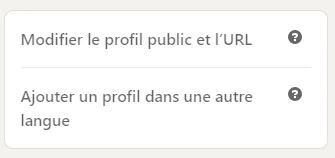
- You choose the language of your choice from: French, German, English , Arabic, Bahasa Indonesia, Chinese (simplified), Chinese (traditional), Korean, Danish, Spanish, Italian, Japanese, Malay, Dutch, Norwegian, Polish, Portuguese, Romanian, Russian, Swedish, Tagalog, Czech, Thai, Turkish.
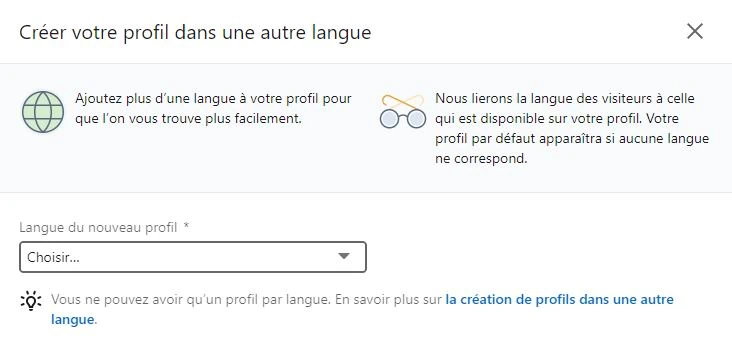
- You can only choose one language per profile, however, it is possible to create as many profiles as desired.
- It is then up to you to take care of the translation of your profile. Last name, first name, presentation of the account, experiences, all the data is to be translated because LinkedIn™ does not take care of it.
If you are not bilingual, you can always use a translator but do not trust him blindly and remember to check the translation, the content must be qualitative!
Know that at any time, you have the possibility to modify or add content by clicking on the small pencil located at the top right of each section.
Is all of my LinkedIn™ profile information translated?
Some headings remain displayed in the language in which they were written. This is the case for publications (texts, articles, surveys), recommendations and your skills.
Do not hesitate to ask for recommendations in several languages, for example, that of the country of the company and yours.

Concerning your publications and your articles , it is up to you, if you wish, to translate them in order to have two versions.
Need to delete a translated secondary profile? We explain how to do it in the rest of this article!
Why does some information on my LinkedIn™ profile always appear in French?
When you view your new profile in the language of your choice, you will notice that some parts and some words on the page still appear in your native language. Don’t panic, it’s normal!
In reality, LinkedIn™ takes into account the country in which it locates you, which is why the summary and the titles of sections such as “Activity”, “Training” or even “Experience” are always written in French. Rest assured, an English user who visits your profile will see these fields in English.

How do other users see your profile and its content? Discover this a little further in our article!
LinkedIn™ translation , is it possible to translate a LinkedIn™ company page?
A company page has the option of translating only its name and description. The rest of the data is kept in the original version, that is to say with the language chosen by default.

Want to find clients on LinkedIn™ without spending your days prospecting? We invite you to attend our free online training . You learn simply and step by step how to use LinkedIn™ to boost your visibility and attract 1 to 5 professional clients per month.
How do I delete my LinkedIn™ profile translated into English or another language?
To delete your translated profile in a different language than yours:
- Go to your LinkedIn™ profile from the menu or by clicking on your profile picture .
- Click on the 🌐 icon, which is located at the top right, next to the languages in which it is possible to view your profile.
- A drop-down menu then appears. It contains all the languages into which your profile is translated.
- One more click on the small cross, located to the right of each language and the secondary profile of your choice is deleted!
- It is not possible to delete your profile which has your default language.
In which language do members of the social network see my profile?
LinkedIn™ members see your profile based on their location. If a translated version in their language is available, it is this one which is automatically proposed. However, an option is offered to them, that of choosing, via the menu at the top right of your profile, in which language to display it.

Of course, these are only the profiles translated by you. However, certain fields on the page, such as the “Recommendations” section, remain in the original language. This is also the case for posts (article, documents, text) that you have not translated.
How do I change the default language of my LinkedIn™ profile?
To change the default language for your LinkedIn™ account:
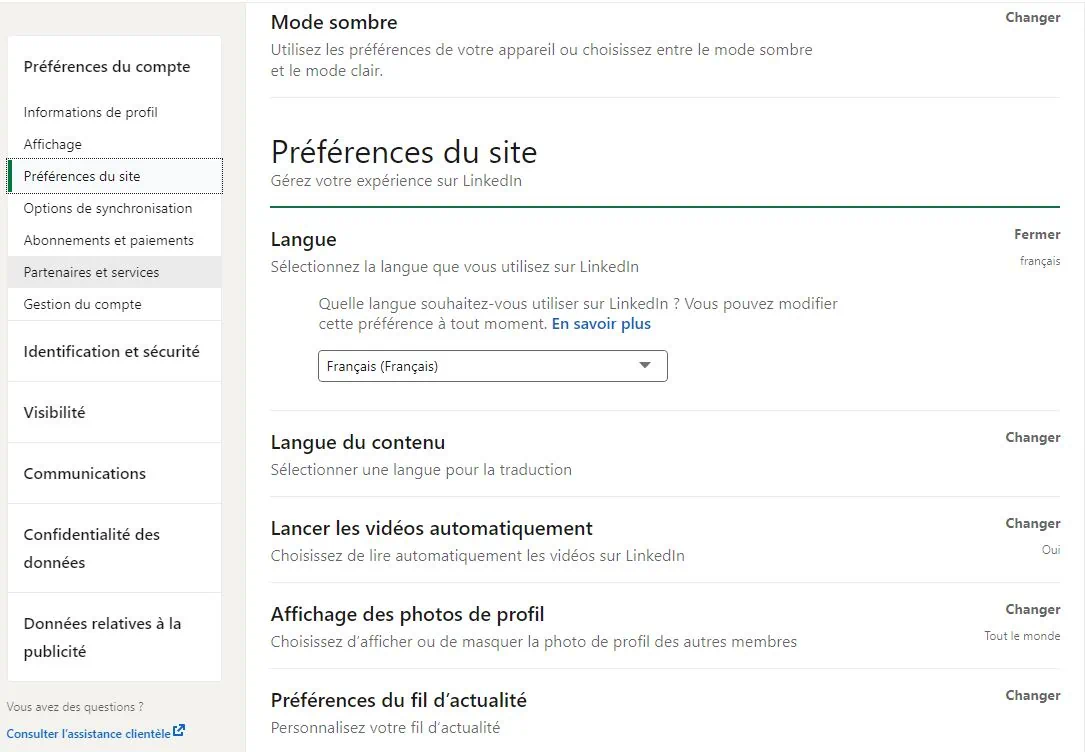
- From your home page, click on “You” then “Preferences and confidentiality”, in the drop-down menu;
- Then select “Account Preferences”, then “Site Preferences”;
- Click on the “Language” section;
- Just select the language of your choice now!
Need help setting up your presence strategy on LinkedIn™? Contact ? Redirect leads and prospects to your blog or your site? Present your services? Find your customers? To finally shine on this famous social network, make an appointment now with a Proinfluent expert !
LinkedIn™ translation to conclude
- Translating your LinkedIn™ profile is essential for companies wishing to extend their trading area, but also for job seekers who are aiming abroad.
- When you translate your profile, you are actually creating a second profile that has its own URL. It is possible to reproduce the operation as many times as you wish, for example to translate your profile into English, Thai and Norwegian.
- To translate your LinkedIn™ profile, simply go to it and click on “Add a profile in another language”. You choose the language and you win!
- Some data cannot be translated. This is the case of your skills, the recommendations as well as your posts.
LinkedIn™ translation to summarize in 4 questions
Why translate your LinkedIn™ profile?
Translating your LinkedIn™ profile increases your visibility with your target audience, if they are not in the same country as you. Translations are recommended to make it easier for companies to find you in search results, and to provide them with an adapted and personalized browsing experience. Translating your LinkedIn™ profile therefore plays a direct role in the development of your business, if you use social networks to prospect. It is also recommended if you are looking for a job abroad and essential if you do business all over the world.
How do you translate your LinkedIn™ profile?
- From your profile, on a computer, select “Add a profile in another language”;
- Choose the language of your choice (only one per profile);
- It is then up to you to translate your data! Make sure the translation is of high quality, especially if you get help from a translator!
How do I remove a language on LinkedIn™?
To remove a language on LinkedIn™:
- From your profile, click on the 🌐 icon, which is located at the top right.
- Then simply click on the small cross, to the left of each language, to delete the one of your choice.
- Warning ! Your default language cannot be deleted, to do so you must first change it.
How do I change the default language in LinkedIn™?
To change the default language on LinkedIn™:
- From your home page, click on “You”;
- In the drop-down menu select “Preferences and privacy”;
- Then go to “Account Preferences”, then “Site Preferences”;
- Select the “Language” section and choose the one of your choice. And now your language is changed!